
 CamsAhead.com
Maps like DeFlock, compared
See the plate readers near you, and the day each was first mapped. Free, no account.
Plate readers © OpenStreetMap contributors (ODbL) · © OpenMapTiles
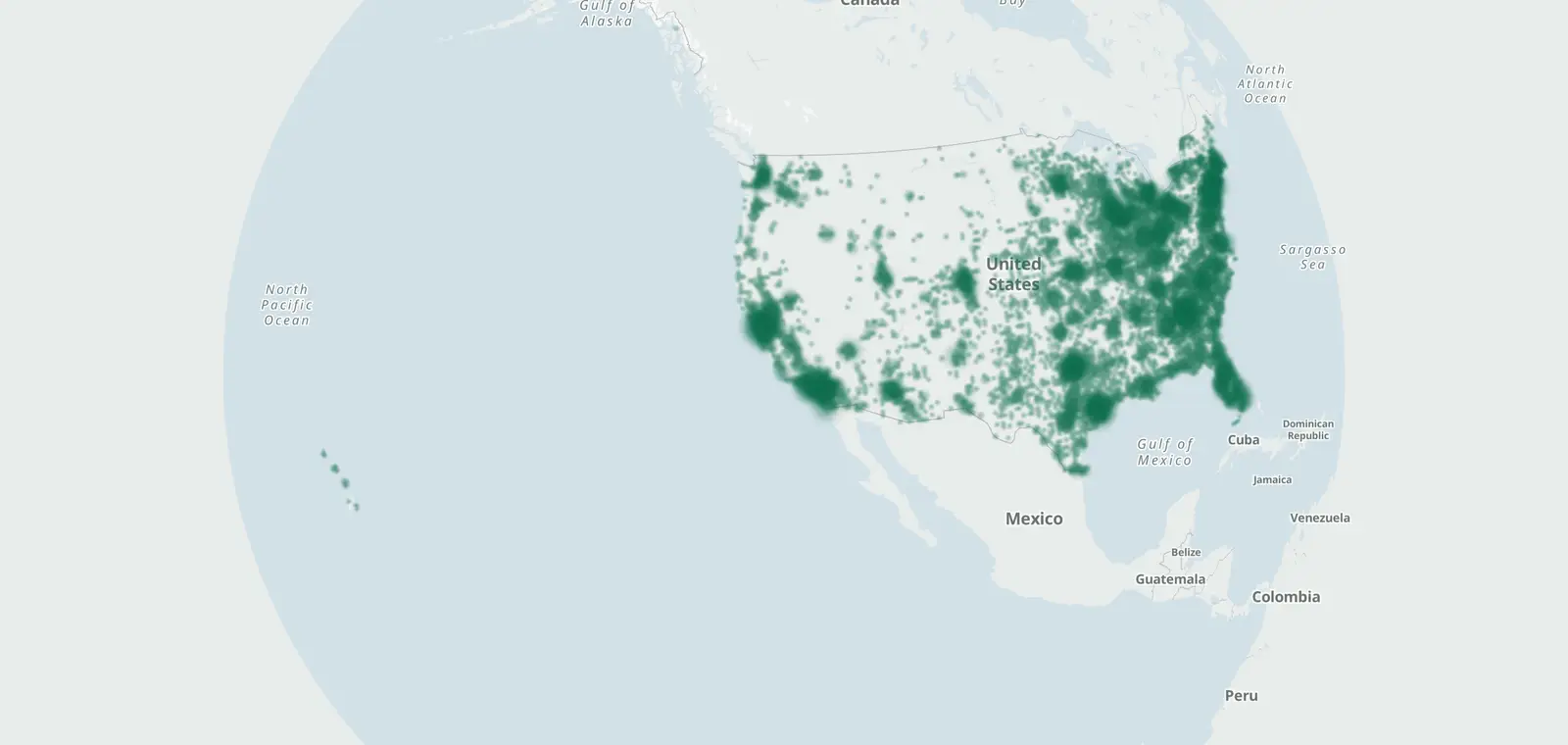
145,670 license plate readers are on the CamsAhead map, as of November 7, 2026, and 116,710 of them are tagged Flock Safety. Each point shows the day it was first mapped. Search a place to see the closest ones, right in your browser, with no app store or account.
What CamsAhead adds to a plate reader map
Speed, red light and traffic cameras too
Plate readers share the map with 199 speed camera locations, 3,613 Caltrans traffic cameras and 98 red light intersections, 12 on a city list.
Open the camera mapFirst-mapped dates and a change log
Each plate reader shows the day it was first mapped, and its last ground check when one is tagged. The change log lists readers added to or removed from the map, by date.
See what changedDrive Beta
Keep the map open. A voice or a chime marks each camera it covers as you reach it, with the posted limit.
Free, no account Beta Report a problem
DriveEmail alerts
Free email alerts for new plate readers mapped near your places. One summary email a month.
Get email alertsData for reporters
CamsAhead sends a free copy of its plate reader data on request, under the Open Database License (ODbL) 1.0.
Ask for the dataHow to read "first mapped" on a plate reader map
A plate reader point shows where a volunteer saw a camera and added it to OpenStreetMap. "First mapped" is the day it was added to the map. It is not the day the camera went up.
Some points also have a check date: the day someone last saw the camera in person. Points without one have no ground check yet.
Know when cameras near you change.
Free email alerts for new plate readers mapped near your places. One summary email a month.
- When a plate reader is first mapped near you
- New cameras mapped or reported near you
- What plate readers keep, and who runs them
- Your street, your distance, the camera types you pick
156,883 cameras listed or mapped so far.
Maps like DeFlock: questions
Is there a Flock camera app?
Yes. CamsAhead maps 145,670 plate readers and runs in your phone's browser, with no app store and no account. The Flock camera app page shows how to add it to your Home Screen, or open the Flock camera map for Flock-tagged readers only.
What's the difference between DeFlock and CamsAhead?
CamsAhead shows plate readers beside speed, red light and traffic cameras, with first-mapped dates, a change log and Drive. DeFlock maps plate readers and helps people add new ones. Both draw the same OpenStreetMap points, so many match.
Where does the data come from?
Plate readers come from OpenStreetMap, where volunteers record the cameras they see, and this copy is from November 7, 2026. Speed and red light cameras come from city lists, and traffic cameras from Caltrans. The Sources section names each one.
Can I get alerts for Flock cameras?
Yes. In Drive (Beta), the map chimes when a plate reader is ahead. Email alerts cover plate readers too: one summary email a month for the places you pick.
Is CamsAhead connected to Flock Safety or DeFlock?
No. See the line at the bottom of every page, and the Independence section of the Terms of Use.
Other plate reader maps
Of these maps, 3 use the same OpenStreetMap points, so many dots match. The other 2 track agencies, not camera spots. Each was checked on October 22, 2026, and its link is in Sources.
- DeFlock Plate reader points from OpenStreetMap.
- FlockHopper (dontgetflocked.com) Plate reader points from OpenStreetMap.
- flockcameralocations.com Plate reader points from OpenStreetMap.
- EyesOnFlock Numbers from agency transparency portals, with no camera spots.
- EFF Atlas of Surveillance Which agencies use which tools, from research by EFF and students.
Sources and updates
- OpenStreetMap contributors: objects tagged surveillance:type=ALPR, data as of Nov 7, 2026; ODbL 1.0
- All sources: the city speed camera lists, the red light list and the Caltrans traffic camera list behind the counts above
- DeFlock: checked Oct 22, 2026
- FlockHopper (dontgetflocked.com): checked Oct 22, 2026
- flockcameralocations.com: checked Oct 22, 2026
- EyesOnFlock: checked Oct 22, 2026
- EFF Atlas of Surveillance: checked Oct 22, 2026
Plate reader points are mapped by OpenStreetMap volunteers (data as of November 7, 2026).
How CamsAhead counts cameras · Report a problem · Report a camera