
 CamsAhead.com
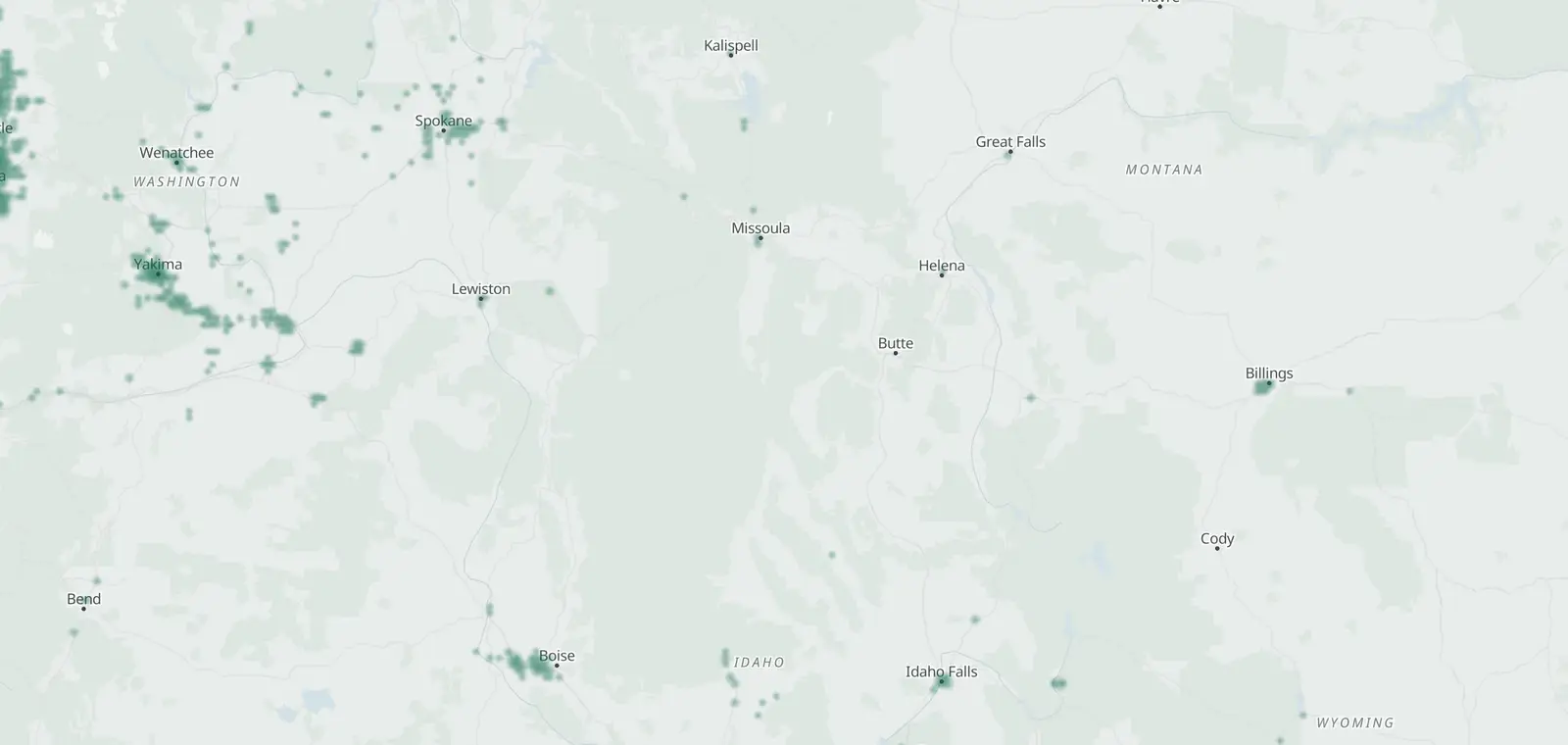
Plate readers © OpenStreetMap contributors (ODbL) · © OpenMapTiles
Montana has 89 mapped plate readers. 72 carry the Flock Safety tag. Most don't say who runs them.
Billings has the most (42), then Missoula (10) and Bozeman (4). The first Flock-tagged one was mapped Apr 3, 2025. A plate reader keeps a record of each car that passes.
See who runs them · Cameras in Montana · What is a Flock camera? · Flock cameras in the US · Other Flock camera maps
Flock cameras in Montana by city

A city links to its own page once enough readers are mapped there.
Plate readers mapped in Montana each month
Plate readers of any maker added to the map each month, not only Flock-tagged ones. Lighter bars are estimates from the first-mapped dates of current points.
CamsAhead started its daily change log on October 22, 2026. How the map changed.
Flock-tagged readers first mapped each month
Each row counts the Flock-tagged readers first mapped that month, newest first. Months with none are left out. Each one carries the date it was first mapped.
| Month | First mapped that month | Top cities |
|---|---|---|
| Oct 2026 | 3 | 2 in Billings and 1 in Hardin |
| Sep 2026 | 17 | 16 in Billings and 1 in Missoula |
| Aug 2026 | 6 | 3 in Billings and 1 in Polson |
| Jul 2026 | 6 | 2 in Billings and 2 in Polson |
| Jun 2026 | 3 | 3 in Billings |
| May 2026 | 5 | 3 in Great Falls and 2 in Billings |
| Apr 2026 | 7 | 7 in Billings |
| Feb 2026 | 2 | 2 in Billings |
| Jan 2026 | 1 | 1 in Missoula |
| Dec 2025 | 2 | 1 in Great Falls and 1 in Missoula |
| Nov 2025 | 5 | 2 in Billings and 2 in Helena |
| Aug 2025 | 13 | 6 in Missoula and 3 in Bozeman |
Who runs the Flock cameras in Montana
Most don't say who runs them. The EFF's Atlas of Surveillance lists 3 agencies in Montana that use plate readers.
- Private operators, not named 18
- BPD 1
Plate reader law in Montana
| Topic | Montana |
|---|---|
| Status | Law |
| Law | Mont. Code Ann. §§ 46-5-117 to -119 (Ch. 202, L. 2017) |
| What it does | Bars state and local agencies from using plate readers on public highways except listed uses; police may use them for listed purposes under a published policy, yearly audits, a 90-day retention cap and no sale of the data. |
| How long it is kept | 90 days for law enforcement data (§ 46-5-118(1)); data under § 46-5-117(2)(a)-(c) (planning, parking, weigh-station screening, an agency's own vehicles) no more than 18 months (§ 46-5-119(3)) |
| Who it can be shared with | Police policy must address sharing with other agencies (§ 46-5-117(2)(d)(i)(C)); law enforcement data may not be sold for any purpose except as § 46-5-117 provides (§ 46-5-118(7)) |
| Public record? | 'is a public record but is protected from disclosure' under the public records parts 'except to the person to whom the license plate is registered' (§ 46-5-118(5)); data under § 46-5-117(2)(a)-(c) is 'private' and 'not a public record' (§ 46-5-119(1)) |
| Owner access | Yes: the protection from disclosure does not apply to 'the person to whom the license plate is registered' (§ 46-5-118(5)) |
| Public records law | Mont. Code Ann. Title 2, ch. 6, parts 10-12 |
| Checked |
See Montana plate reader law next to the other states.
Flock cameras in Montana: questions
How many Flock cameras are in Montana?
72 plate readers tagged Flock Safety are on the map in Montana, as of November 7, 2026. The real number may be higher or lower: the map shows only the cameras mapped so far.
Which cities in Montana have the most Flock cameras?
By mapped count: Billings (42), Missoula (10) and Bozeman (4). The city list on this page shows each city with a Flock-tagged reader.
Is each mapped camera still there?
Not always. A point shows where someone mapped a camera. None of the 72 carries a date from a check on the ground yet.
Montana's plate reader data
From OpenStreetMap, under the Open Database License (ODbL) 1.0. A free copy goes to anyone who asks: how it is made and how to ask.
Know when cameras in Montana change.
Free email alerts for new plate readers mapped near your places. One summary email a month.
- When a plate reader is first mapped near you
- New cameras mapped or reported near you
- What plate readers keep, and who runs them
- Your street, your distance, the camera types you pick
89 cameras listed or mapped in Montana so far.
Sources and updates
How this page was made: CamsAhead writes each page type once, then fills it with this place's data from the sources below.
- OpenStreetMap contributors: plate readers, data as of Nov 7, 2026; ODbL 1.0
- EFF Atlas of Surveillance: agencies that use plate readers, data as of Aug 2026; CC BY 4.0
- Mont. Code Ann. §§ 46-5-117 to -119 (Ch. 202, L. 2017): plate reader law, checked Oct 25, 2026
- Reporters Committee for Freedom of the Press, Open Government Guide: public records law, checked Oct 25, 2026
Plate reader points are mapped by OpenStreetMap volunteers (data as of November 7, 2026).
How CamsAhead counts cameras · Report a problem · Report a camera