
 CamsAhead.com
Flock cameras in North Charleston, SC
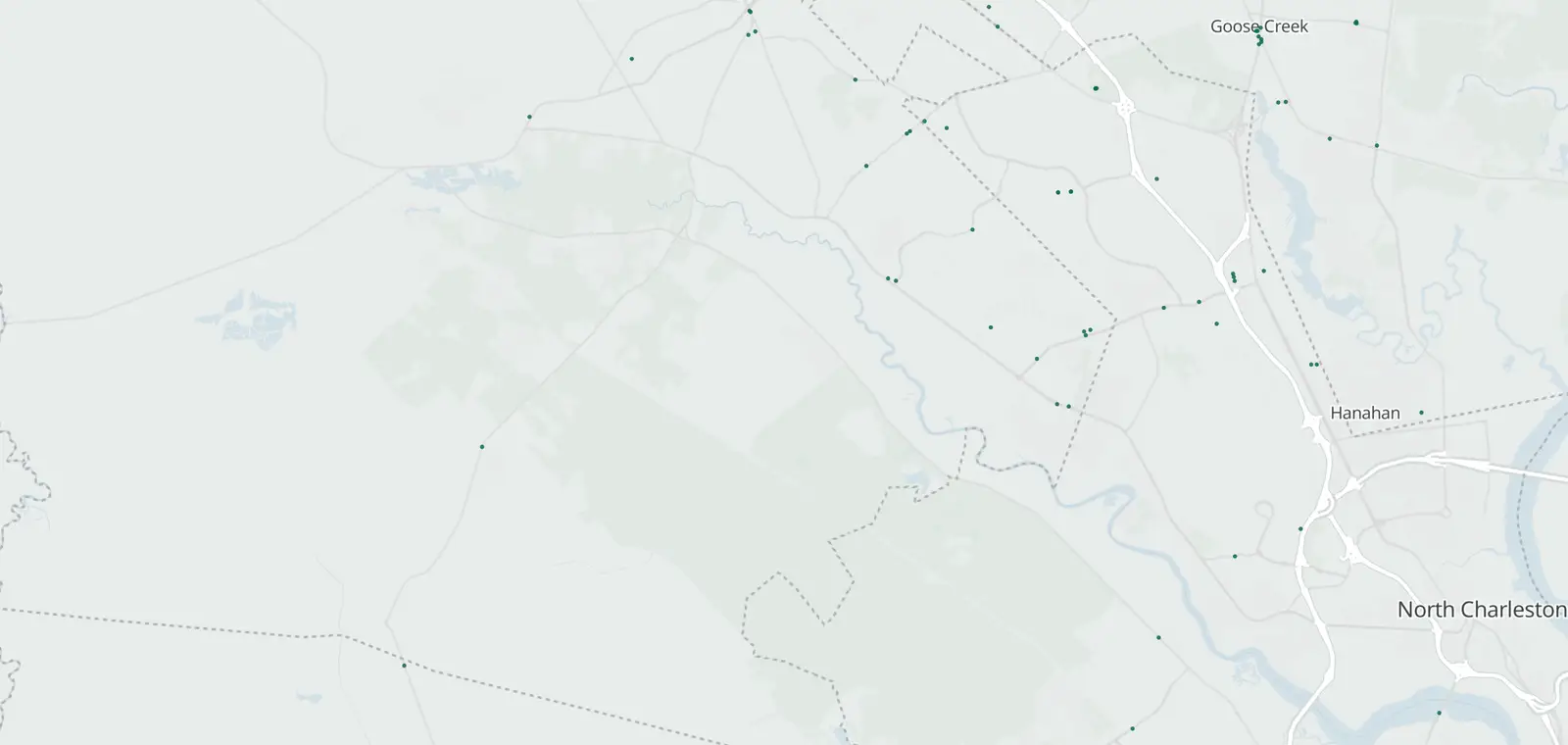
26 plate readers tagged Flock Safety in North Charleston.
Plate readers © OpenStreetMap contributors (ODbL) · © OpenMapTiles
North Charleston has 32 mapped plate readers. 26 carry the Flock Safety tag. Most don't say who runs them.
They were first mapped between Dec 15, 2025 and Oct 23, 2026. A plate reader keeps a record of each car that passes. Whoever runs it sets how long, within state law.
Flock cameras in North Charleston: locations by ZIP code
ZIP 29406 has the most (10), then 29456 (10) and 29418 (4). Mounted on, where known: 7 on poles, 1 on a building and 1 on a street light.
| Where | Maker tag and operator | Facing | First mapped |
|---|---|---|---|
| Near ZIP 29404 Show on map | Flock Safety Run by: Not listed yet | Faces south (as mapped) | Sep 7, 2026 |
| Near ZIP 29404 Show on map | Flock Safety Run by: Not listed yet | Faces northeast (as mapped) | Oct 23, 2026 |
| Near ZIP 29406 Show on map | Flock Safety Run by: A private operator, not named | Faces west-southwest (as mapped) | Dec 15, 2025 |
| Near ZIP 29406 Show on map | Flock Safety Run by: A private operator, not named | Faces west-southwest (as mapped) | Dec 15, 2025 |
| Near ZIP 29406 Show on map | Flock Safety Run by: A private operator, not named | Faces west-southwest (as mapped) | Dec 15, 2025 |
| Near ZIP 29406 Show on map | Flock Safety Run by: Not listed yet | Faces west-southwest and northeast (as mapped) | Jul 4, 2026 |
| Near ZIP 29406 Show on map | Flock Safety Run by: Not listed yet | Faces southwest and north-northeast (as mapped) | Jul 4, 2026 |
| Near ZIP 29406 Show on map | Flock Safety Run by: Not listed yet | Faces east and west (as mapped) | Jul 23, 2026 |
| Near ZIP 29406 Show on map | Flock Safety Run by: Not listed yet | Faces south (as mapped) | Aug 18, 2026 |
| Near ZIP 29406 Show on map | Flock Safety Run by: Not listed yet | Faces north (as mapped) | Aug 19, 2026 |
| Near ZIP 29406 Show on map | Flock Safety Run by: Not listed yet | Faces northwest (as mapped) | Aug 24, 2026 |
| Near ZIP 29406 Show on map | Flock Safety Run by: Not listed yet | Faces east-northeast, west-southwest, east-southeast, south, west-northwest and north (as mapped) | Oct 20, 2026 |
| Near ZIP 29418 Show on map | Flock Safety Run by: A private operator, not named | Faces west (as mapped) | Dec 15, 2025 |
| Near ZIP 29418 Show on map | Flock Safety Run by: A private operator, not named | Faces east (as mapped) | Dec 15, 2025 |
| Near ZIP 29418 Show on map | Flock Safety Run by: Not listed yet | Faces northeast and west-southwest (as mapped) | Jul 19, 2026 |
| Near ZIP 29418 Show on map | Flock Safety Run by: Not listed yet | Faces southeast and west-northwest (as mapped) | Jul 20, 2026 |
| Near ZIP 29456 Show on map | Flock Safety Run by: Not listed yet | Faces southeast (as mapped) | Jul 4, 2026 |
| Near ZIP 29456 Show on map | Flock Safety Run by: Not listed yet | Faces north-northwest (as mapped) | Jul 7, 2026 |
| Near ZIP 29456 Show on map | Flock Safety Run by: Not listed yet | Faces south-southeast (as mapped) | Jul 7, 2026 |
| Near ZIP 29456 Show on map | Flock Safety Run by: Not listed yet | Faces north-northwest (as mapped) | Jul 7, 2026 |
| Near ZIP 29456 Show on map | Flock Safety Run by: Not listed yet | Faces south (as mapped) | Jul 7, 2026 |
| Near ZIP 29456 Show on map | Flock Safety Run by: Not listed yet | Faces north and south (as mapped) | Jul 20, 2026 |
| Near ZIP 29456 Show on map | Flock Safety Run by: Not listed yet | Faces south (as mapped) | Aug 7, 2026 |
| Near ZIP 29456 Show on map | Flock Safety Run by: Not listed yet | Faces north (as mapped) | Oct 5, 2026 |
| Near ZIP 29456 Show on map | Flock Safety Run by: A private operator, not named | Faces north (as mapped) | Oct 5, 2026 |
| Near ZIP 29456 Show on map | Flock Safety Run by: Not listed yet | Direction not mapped | Oct 5, 2026 |
Near you: Flock cameras near me.
Who runs the Flock cameras in North Charleston
Most don't say who runs them.
- Private operators, not named 6
What the Flock cameras in North Charleston keep
- Records
- The plate of each car that passes, with the time and place. Often a photo of the car.
- Run by
- Most don't say. Tagged ones include private operators (6).
- Kept for
- Not published on the map. Each operator sets its own. Flock Safety’s FAQ: “Flock recommends a 7-day default.”
- Who sees it
- Whoever runs it, and those it shares with.
- How to ask
- Read the operator's policy. Or ask the city for its records.
Who can search plate reads in North Charleston
EyesOnFlock lists no transparency portal for the North Charleston Police Department (Oct 14, 2026). It posts no sharing list, so who can search reads from its cameras is not stated. The sharing lists of 52 agencies name it, so it can search their reads.
North Charleston Police Department
- Agencies on its posted sharing list
- Not stated
- Keeps each read for
- Not stated
- Agencies whose reads it can search
- 52
No transparency portal listed, Oct 14, 2026 · See its sharing lists, as of Oct 14, 2026
Get one summary email a month on new plate readers in North Charleston
Portal figures and sharing lists: EyesOnFlock (CC BY-SA 4.0), from Flock Safety transparency portals.
When the Flock cameras in North Charleston were first mapped
Flock-tagged readers here were first mapped from December 15, 2025 to October 23, 2026. 21 of the 26 were first mapped in 2026, with 11 in July alone.
CamsAhead started its daily change log on October 22, 2026. How the map changed.
Flock cameras near North Charleston
Flock cameras in North Charleston, SC: questions
How many Flock cameras are in North Charleston?
26 plate readers tagged Flock Safety are on the map in North Charleston, SC, as of November 7, 2026.
Where are the Flock cameras in North Charleston?
The table lists the most recently mapped ones by ZIP code, and the map shows all of them. ZIPs 29406 and 29456 have the most (10 each).
Who runs the plate readers in North Charleston?
Most don't say who runs them. Whoever runs each one sets how long it keeps the reads and who can search them, within South Carolina law.
Which agencies around North Charleston use plate readers?
The EFF's Atlas of Surveillance lists North Charleston Police Department and Charleston County Sheriff's Office as agencies that use plate readers.
Which way does each camera face?
25 of the 26 carry a direction tag, and the map draws each of those as a cone.
Know when cameras in North Charleston change.
Free email alerts for new plate readers mapped near your places. One summary email a month.
- When a plate reader is first mapped near you
- New cameras mapped or reported near you
- What plate readers keep, and who runs them
- Your street, your distance, the camera types you pick
156,883 cameras listed or mapped so far.
Sources and updates
How this page was made: CamsAhead writes each page type once, then fills it with this place's data from the sources below.
- OpenStreetMap contributors: plate readers in North Charleston, SC, data as of Nov 7, 2026; ODbL 1.0
- Flock Safety FAQ: the default retention quoted in What they keep, read Oct 24, 2026
- EFF Atlas of Surveillance: agencies that use plate readers, data as of Aug 2026; CC BY 4.0
Plate reader points are mapped by OpenStreetMap volunteers (data as of November 7, 2026).
How CamsAhead counts cameras · Report a problem · Report a camera