
CamsAhead

Near me

Near me
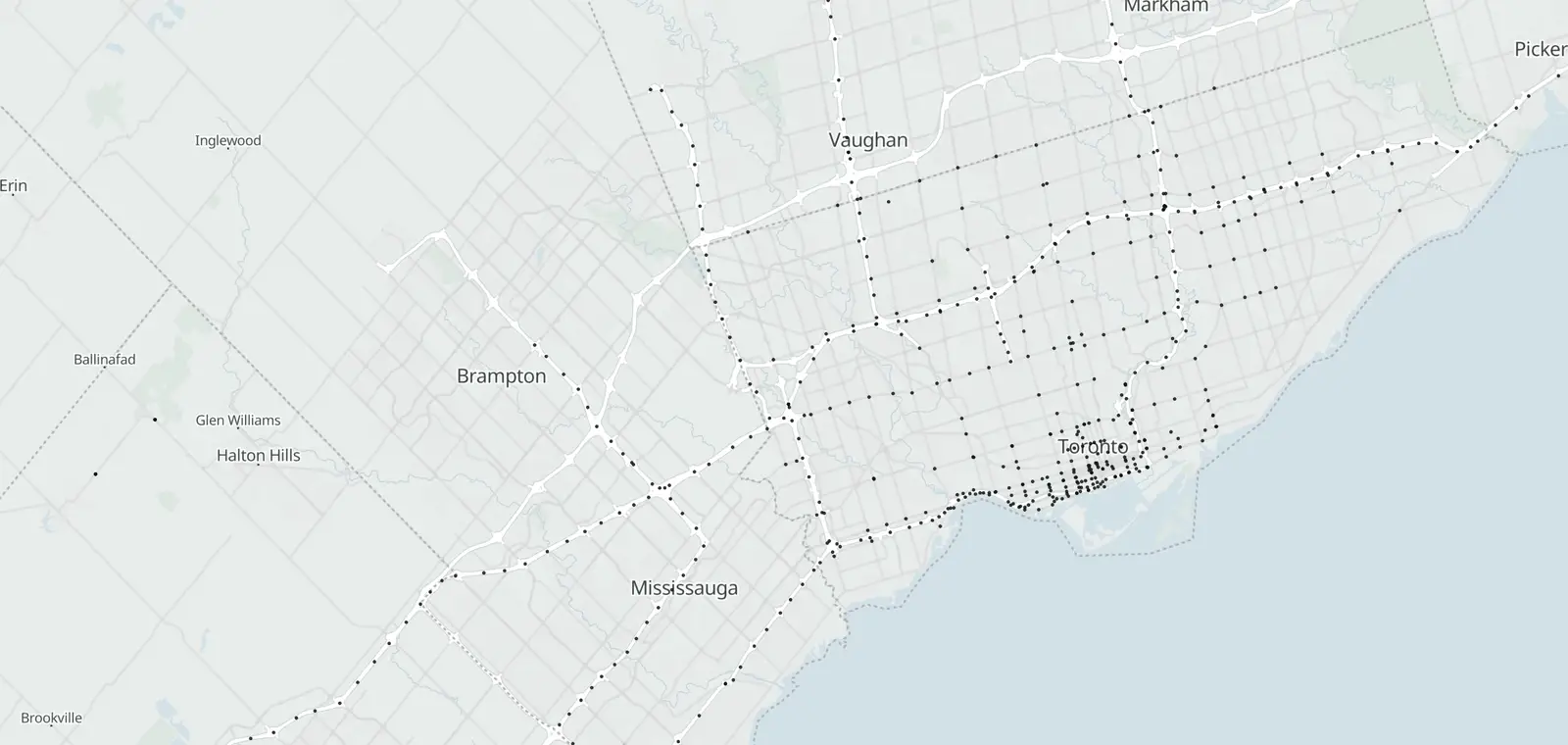
Map of 429 traffic cameras around Toronto, 336 of them the City of Toronto's
In Toronto Traffic cameras 429 Open map
Open map

Traffic cameras in Toronto

336 City of Toronto cameras, 314 with a picture shown here, and 93 of Ontario 511's on the highways in view.

Checked

© OpenStreetMap contributors · © OpenMapTiles

The City of Toronto posts still pictures from 336 traffic cameras on the Gardiner Expressway, Don Valley Parkway, Allen Road and main streets. This page lists them by road and cross street; tap a camera to see its picture from the City's feed. The map also shows 93 Ontario 511 highway cameras, not listed here. Checked October 27, 2026.

Toronto traffic cameras by road

34 roads by camera count, each camera named as the City names it: the road, then the cross street. Tap Show picture to see one.

Road and cross streetPicture
Gardiner Expressway19
F G Gardiner XY at Parliament StOpen the City's picture ↗
F G Gardiner XY at Lower Jarvis StOpen the City's picture ↗
F G Gardiner XY E at Spadina AveOpen the City's picture ↗
Don Valley Parkway15
Don Valley Parkway at Eastern Ave
Don Valley Parkway at Dundas St E
Don Valley Parkway at Prince Edward Viaduct / Danforth Ave
Allen Road8
W R Allen Rd S at Eglinton Ave W
W R Allen Rd at Elm Ridge Dr
W R Allen Rd at Viewmount Ave
Lake Shore Blvd31
Lake Shore Blvd E at Don Roadway
Lake Shore Blvd W at Bremner Blvd
Lake Shore Blvd W at Rees StOpen the City's picture ↗
Eglinton Ave24
Eglinton Ave E at Kennedy Rd
Eglinton Ave E at Birchmount Rd
Eglinton Ave E at Warden Ave
Bayview Ave12
Bayview Ave at Pottery Rd / Private Access
Bayview Ave at Rosedale Valley Rd
Bayview Ave at Pottery Rd
Queen St12
Queen St W at Lansdowne Ave / Jameson Ave
Queen St W at Dufferin St
Yonge St12
Yonge St at Dundas St
Yonge St at College St / Carlton St
Yonge St at Bloor St
Sheppard Ave11
Sheppard Ave E at Markham Rd
Sheppard Ave E at Mccowan Rd
Sheppard Ave E at Kennedy Rd
Spadina Ave10
Spadina Ave at Front St W
Spadina Ave at Richmond St W
Spadina Ave at Bloor St W
The Queensway9
The Queensway at Colborne Lodge Dr
The Queensway at King St W / Roncesvalles Ave
University Ave9
University Ave at Front St W / York St
University Ave at Adelaide St W
University Ave at Richmond St W
Bathurst St8
Bathurst St at Front St W
Bathurst St at Bloor St W
Dundas St8
Dundas St W at The West Mall
Dundas St W at Keele St
Dundas St W at Cloverdale Mall / 427 C N Dundas Ramp
Bay St7
Bay St at Adelaide St W
Bay St at Richmond St W
Bay St at College St
King St7
King St E at Parliament St
King St W at Jameson Ave
King St W at Dufferin St
Steeles Ave7
Steeles Ave E at Woodbine Ave
Steeles Ave W at Dufferin St
Steeles Ave E at Kennedy Rd
Don Mills Rd6
Don Mills Rd at Overlea Blvd / Gateway Blvd
Don Mills Rd at O Connor Dr
Don Mills Rd at Lawrence Ave E
Dufferin St6
Dufferin St at Bloor St W
Dufferin St at Finch Ave W
Bloor St5
Bloor St W at Castle Frank Rd
Bloor St E at Ted Rogers Way
Bloor St W at Keele St / Parkside Dr
Danforth Ave5
Danforth Ave at Greenwood Ave
Danforth Ave at Pape Ave
Danforth Ave at Woodbine Ave
Keele St5
Keele St at St Clair Ave W
Keele St at Steeles Ave W
Keele St at Floral Pkwy / 401 C E Keele St Ramp
Victoria Park Ave5
Victoria Park Ave at Lawrence Ave E
Victoria Park Ave at Parkwoods Village Dr / Ellesmere Rd
Victoria Park Ave at Finch Ave E
Jarvis St4
Jarvis St at Front St E / Lower Jarvis St
Jarvis St at King St E
Jarvis St at Dundas St E
Kingston Rd4
Kingston Rd at Lawrence Ave E
Kingston Rd at 401 C E 2a W Ramp
Kingston Rd at Woodbine Ave
Mount Pleasant Rd4
Mount Pleasant Rd at St Clair Ave E
Mount Pleasant Rd at Lawrence Ave E
Mount Pleasant Rd at Broadway AveOpen the City's picture ↗
Adelaide St3
Adelaide St E at Parliament St
Adelaide St E at Church St
Adelaide St W at Simcoe St
Avenue Rd3
Avenue Rd at Bloor St W
Avenue Rd at Wilson Ave
Finch Ave3
Finch Ave E at 404 S Finch Ramp
Finch Ave W at 400 S Finch W Ramp
Finch Ave E at Doris AveOpen the City's picture ↗
Front St3
Front St W at Simcoe St / Lower Simcoe St
Front St W at John St / Private Access
Front St W at Blue Jays Way
Islington Ave3
Islington Ave at Bloor St W
Islington Ave at 401 C W Islington N Ramp / Allenby Ave
Kipling Ave3
Kipling Ave at The Queensway
Kipling Ave at Evans Ave
Kipling Ave at F G Gardiner C E
Strachan Ave3
Strachan Ave at Fleet St / Manitoba Dr
Strachan Ave at East Liberty St / Ordnance St
Strachan Ave at Wellington St W / Douro St
Other roads62
York St at Bremner Blvd / Raptors Way
Lower Simcoe St at Bremner Blvd
Richmond St E at Parliament St

Speed and red light cameras are separate

Ontario ended municipal automated speed enforcement in November 2025 (Bill 56, Building a More Competitive Economy Act, 2025). The City lists its red light camera locations on its own page. CamsAhead has no Canadian enforcement layer yet.

Highway 401, the 400-series and the QEW: Ontario 511

Highway 401, the other 400-series highways and the QEW are the Ministry of Transportation's: Ontario 511 posts their cameras. Ontario 511 covers the province, including Durham Region and the GTA highways.

About the City of Toronto traffic cameras

The City of Toronto's Transportation Services runs these cameras on the expressways and main streets. They post still pictures; 22 of the City's pictures are large files that open from a link.

CamsAhead loads each picture from the City when you tap it and keeps none. It checks the City's list, last October 27, 2026.

427 plate readers are on the map in the Toronto area: see plate readers in Canada.

Other Canadian cities: Traffic cameras in Calgary. All of Canada: cameras in Canada.

Toronto traffic camera questions

Do these cameras show video?

No. They post still pictures from the City's feed, and one loads here when you tap it.

Where are the 401 cameras?

On the map, from Ontario 511. The City's list covers city roads.

Does Toronto still have speed cameras?

No. Ontario ended municipal automated speed enforcement in November 2025 (Bill 56, Building a More Competitive Economy Act, 2025).

Where are Toronto's red light cameras?

On the City's red light camera page. They are not on this page.

How many traffic cameras does the City of Toronto have?

The City lists 336 cameras with a picture; 314 show here and 22 open from a link. Checked October 27, 2026.

Can I get a picture or footage from a camera?

Not from CamsAhead: it keeps no pictures. Ontario 511's FAQ explains copies of the province's images; the City handles its own.

Are there plate readers in Toronto?

427 plate readers are on the map in the Toronto area: see plate readers in Canada.

Sources and updates

  • City of Toronto, Transportation Services: Contains information licensed under the Open Government Licence – Toronto (Open Government Licence – Toronto). The City's list, checked October 27, 2026. Pictures load from the City when you tap one; CamsAhead stores none.

How CamsAhead counts cameras · Report a problem · Report a camera

Add CamsAhead to your Home Screen Open in Safari to install Drive works best from your Home Screen Open in Safari to add it to your Home Screen

It opens straight to the map.

This app’s built-in browser can’t add CamsAhead to your Home Screen.

From your Home Screen, CamsAhead opens full screen with one tap. It keeps the screen on while you drive, where your phone allows it.

  1. Tap Share
    In Safari’s toolbar, or in its ⋯ menu.
  2. Tap Share
    In your browser’s address bar or menu.
  3. Open this page in Safari
    Look for “Open in Safari” or “Open in browser” in this app’s menu, or copy the link.
  4. Copy the link, then paste it in Safari
    Or type CamsAhead.com in Safari.
  5. In Safari, tap Share, then Add to Home Screen
  6. Tap Add to Home Screen
    Scroll down the list if you don’t see it.
  7. Open the ⋮ menu
    Then tap “Add to Home screen” or “Install app”.
  8. Tap Add, then open CamsAhead from your Home Screen. Tap Install, then open CamsAhead from your Home Screen.

Don’t see Add to Home Screen? Open this page in Safari.

Or tap Share in this browser, then Add to Home Screen.

Alerts work while CamsAhead is open on screen, from the Home Screen or the browser. If the screen locks or you switch apps, they stop.

DriveBetaReport a problem