
 CamsAhead.com
Warnings from Wed Oct 7Tickets from Dec 7
Long Beach speed cameras
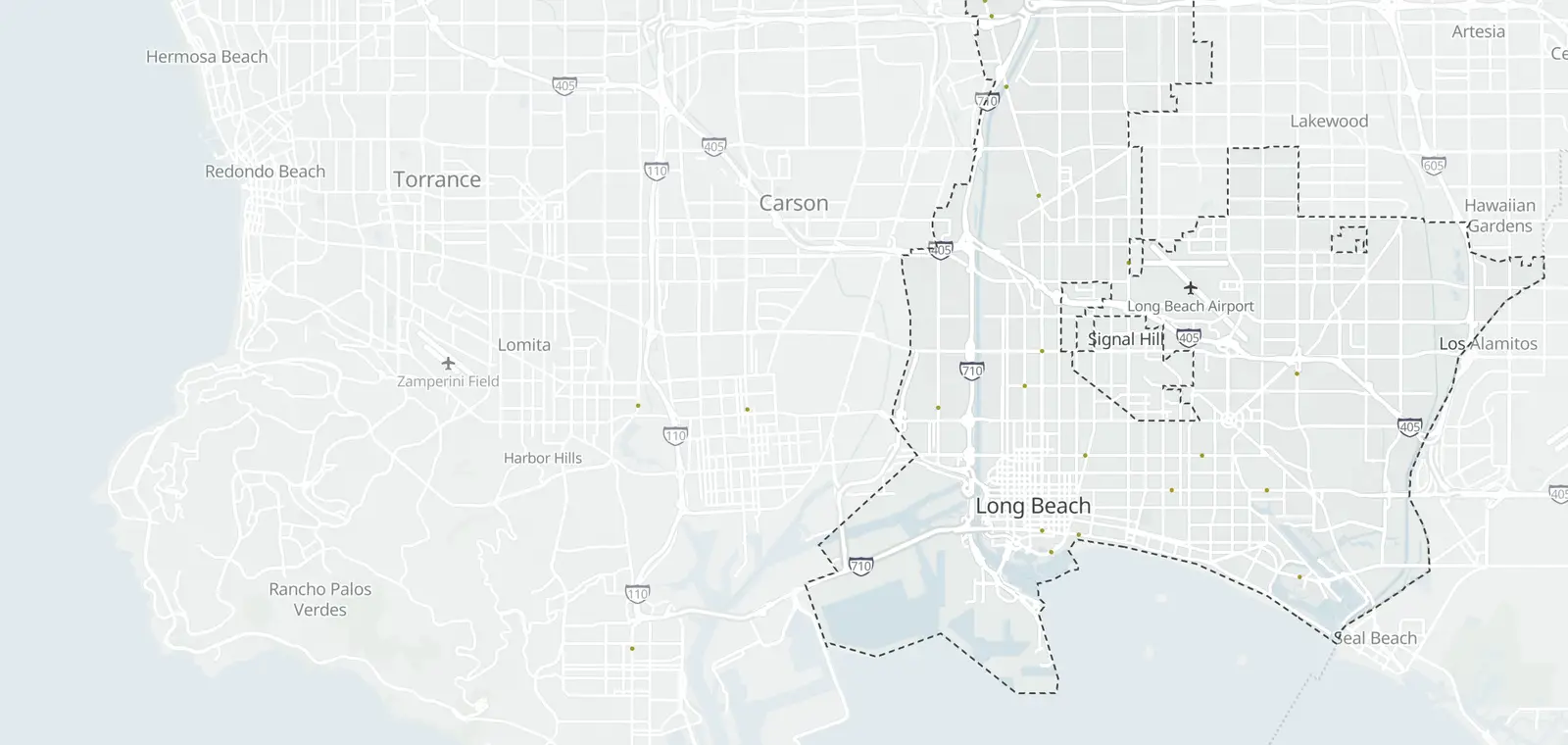
18 speed camera locations from the city's list. CamsAhead pins each one halfway along its stretch; the city's list gives the stretch, not the spot.
© OpenMapTiles © OpenStreetMap contributors
Long Beach lists 18 speed camera locations under AB 645, run by the City of Long Beach. The warning period began Oct 7, 2026, and warning notices carry no fine. The city says tickets start Dec 7, 2026. Each camera is listed below by its stretch of street.
Where the Long Beach speed cameras are
How to read the table
The city's impact report lists each camera as a stretch of street with its council district and posted limit, but no coordinates.
| Status | Street and segment | Tickets | Posted limit |
|---|---|---|---|
| Warning period | Artesia Boulevard Harbor to Butler #1 · Show on map · pinned halfway | From Dec 7, 2026 Published | 30 mph |
| Warning period | Second Street Bay Shore to Appian #2 · Show on map · pinned halfway | From Dec 7, 2026 Published | 25 mph |
| Warning period | Pacific Avenue Willow to PCH #3 · Show on map · pinned halfway | From Dec 7, 2026 Published | 25/30 mph |
| Warning period | 7th Street Cherry to Termino #4 · Show on map · pinned halfway | From Dec 7, 2026 Published | 30 mph |
| Warning period | Atlantic Avenue LA River to Artesia #5 · Show on map · pinned halfway | From Dec 7, 2026 Published | 35 mph |
| Warning period | Long Beach Boulevard Victoria to Market #6 · Show on map · pinned halfway | From Dec 7, 2026 Published | 30 mph |
| Warning period | Ocean Boulevard Pacific to Atlantic #7 · Show on map · pinned halfway | From Dec 7, 2026 Published | 30 mph |
| Warning period | Willow Street Pacific to Atlantic #8 · Show on map · pinned halfway | From Dec 7, 2026 Published | 30 mph |
| Warning period | Anaheim Street Redondo to Termino #9 · Show on map · pinned halfway | From Dec 7, 2026 Published | 30 mph |
| Warning period | Shoreline Drive Pine Ave to Ocean Blvd #10 · Show on map · pinned halfway | From Dec 7, 2026 Published | 35 mph |
| Warning period | Ocean Blvd Alamitos Ave to Orange Ave #11 · Show on map · pinned halfway | From Dec 7, 2026 Published | 30 mph |
| Warning period | 7th Street Park Ave to Santiago Ave #12 · Show on map · pinned halfway | From Dec 7, 2026 Published | 40 mph |
| Warning period | Bellflower Boulevard Stearns St to Willow St #13 · Show on map · pinned halfway | From Dec 7, 2026 Published | 40 mph |
| Warning period | Cherry Avenue Wardlow Rd to Bixby Rd #14 · Show on map · pinned halfway | From Dec 7, 2026 Published | 40 mph |
| Warning period | Anaheim Street Atlantic Ave to Walnut Ave #15 · Show on map · pinned halfway | From Dec 7, 2026 Published | 30 mph |
| Warning period | Santa Fe Avenue Pacific Coast Hwy to 21st St #16 · Show on map · pinned halfway | From Dec 7, 2026 Published | 35 mph |
| Warning period | Long Beach Boulevard San Antonio Dr to 45th St #17 · Show on map · pinned halfway | From Dec 7, 2026 Published | 35 mph |
| Warning period | Long Beach Boulevard Artesia Blvd to 70th St #18 · Show on map · pinned halfway | From Dec 7, 2026 Published | 35 mph |
Open these cameras on the full map →
Drive (Beta) speaks as you enter a stretch with a speed camera: speed camera app.
Know when cameras in Long Beach change.
Free email alerts for cameras on your routes that start issuing tickets. One summary email a month.
- In your monthly summary: the day a camera near you starts issuing tickets
- New cameras mapped or reported near you
- Your street, your distance, the camera types you pick
156,883 cameras listed or mapped so far.
Speed camera fines and tickets in Long Beach
These are the camera fines AB 645 sets for Long Beach and the other cities it names (California Vehicle Code §22426(c)). They are civil penalties with no license points.
Show how to pay or contest a ticket
The notice is mailed within 15 days of the violation. You then have 30 days from the mailing to pay (California Vehicle Code §22426(e)). To pay or contest, follow the steps on the notice.
To contest: a free initial review, then an administrative hearing, then an appeal to superior court (California Vehicle Code §§22427 and 22428).
Drivers with low incomes can ask for a smaller fine or a payment plan (California Vehicle Code §22429). People who qualify as indigent get 80% off, and people with incomes up to 250% of the federal poverty level get 50% off. Payment plans cost at most $25 a month.
City of Long Beach lists its pay and contest steps on its program page.
When does a California speed camera ticket start?
AB 645 sets the ticket threshold at 11 mph or more over the posted limit (California Vehicle Code §22426(b)). The posted limit is the law, and it is the number this site shows at each camera.
How much is a ticket for going 16 to 25 mph over in California?
Under AB 645, a speed camera fine for 16 to 25 mph over the limit is $100 (California Vehicle Code §22426(c)). It is a civil penalty with no license points. Drivers with low incomes can ask for a smaller fine or a payment plan.
How Long Beach's speed camera program works
Show how the program works
Under AB 645, a city's first 60 days of enforcement send only warnings (California Vehicle Code §22425(f)). So do the first 60 days on each street it adds later. Then a notice can carry a civil fine, with no points on your license (California Vehicle Code §22426(a)). Notices go by mail to the car's registered owner.
A sign must stand within 500 feet before each camera. It says "Photo Enforced" and shows the posted limit (California Vehicle Code §22425(d)). The cameras may not run on state routes, such as freeways (California Vehicle Code §22425(e)).
City of Long Beach Public Works runs the Long Beach program and publishes the list this page is built from. Source: City of Long Beach.
What changed in Long Beach
Every change CamsAhead finds in the City of Long Beach list is logged here with its date.
- First CamsAhead snapshot of City of Long Beach's list: 18 cameras Oct 21, 2026
Long Beach speed camera questions
Where are the speed cameras in Long Beach?
The city's impact report lists 18 stretches of street, each with its council district and posted limit. The table on this page lists all of them. The city has not published exact camera coordinates.
Are speed camera tickets enforceable in California?
Yes. Under AB 645, a camera ticket is a civil penalty with no license points (California Vehicle Code §22426(a)). It is sent to the vehicle's registered owner. Each notice explains how to pay or contest it.
How do I pay or contest a Long Beach speed camera ticket?
There is nothing to pay before Dec 7, 2026. After that, follow the steps on the notice. To contest a ticket, the first step is a free review.
When do Long Beach speed cameras start issuing tickets?
The city says tickets start Dec 7, 2026. Until then, the cameras at its 18 locations send warning notices with no fine. The warning period began Oct 7, 2026. AB 645 gives the first 60 days of enforcement warnings only, and the same on each street added later (California Vehicle Code §22425(f)).
Other California speed camera programs
Other cameras in Long Beach · California speed cameras · Speed cameras in other states
Long Beach speed camera data
Reporters and researchers can ask for the list as a file, with the source of each row: data for reporters and researchers.
Sources and updates
How this page was made: CamsAhead writes each page type once, then fills it with this place's data from the sources below.
- City of Long Beach: Speed Safety System Impact Report, Appendix 1 Tables 3-4 (18 initial locations), retrieved October 21, 2026. Public city records; no license stated.
Cite this page: “Long Beach Speed Cameras: 18 Locations, 18 in Warning”, CamsAhead.com, https://camsahead.com/california/long-beach/speed-cameras/, updated October 21, 2026.
How CamsAhead counts cameras · Report a problem · Report a camera